Love Coupons Australia
Samsung discount codes and coupon codes

Best Samsung Promo Codes

4.0 (57 ratings)
5 active offers Best Deal: $300 off

Best Samsung Promo Codes and Deals for August 2026

NEW

Secure a saving of up to $300 when you pre order the highly anticipated Samsung Galaxy Watch9 or the new Ultra2 during the Afterpay Day event.

Terms and conditions

This special offer is available for a limited duration only. All promotional prices are clearly marked on the respective products. The discount applies exclusively to selected items within the promotion. For a comprehensive list of terms and conditions, please visit the Samsung website.

Cashback
4.2%

Cashback Now Available with Love Cashback

Earn up to 4.2% back from your total purchase price when you shop at Samsung through Love Cashback.

Claim a $50 eVoucher for students from Samsung to assist with student purchases.

Terms and conditions

  • Limited time only.
  • For a limited time,
  • Eligible recipients who have completed the O Week registration form on Samsung.com/au may receive a unique voucher code valued at $50 (AUD).
  • The $50 eVoucher can be applied in the Samsung Education Store towards Samsung Products including Devices, Appliances and Accessories.
  • Voucher cannot be redeemed on the Samsung Online Store or on other Samsung Enhanced Partnership Portals.
  • The voucher cannot be used to purchase Service Products such as Samsung Care and Knox Manage Subscriptions.
  • A minimum purchase of $300 applies to use the $50 eVoucher.
  • Total cart value after any other discounts have been applied must be at least $300 before this voucher can be applied.
  • The unique voucher code and offer are available from 12:00am (AEST) 6 July 2026 until 11:59pm (AEDT) 10 October 2026 unless withdrawn earlier.
  • Eligible products and their pricing are subject to change. Offer is subject to stock availability at time of purchase.
  • Not available in conjunction with any other offer unless otherwise advised.
  • The offer code may be used once only, must be entered at checkout, and is not transferable, exchangeable or redeemable for cash.
  • This offer may be extended by Samsung at any time in its sole discretion.
  • Offer subject to Samsung Terms & Conditions of Sale.
  • For full Terms & Conditions please see the Samsung website.

Grab a $50 eVoucher from Samsung when you spend $300 or more in the Samsung Education Store.

Terms and conditions

Terms and Conditions apply. Limited time only.

Never miss cashback. Our free Chrome extension alerts you automatically at every partner store.

Add to Chrome – It's Free

Get 5% off your first order at the Samsung Education Store and start saving on tech today.

Terms and conditions

Terms and Conditions apply. Limited time only.

Free Shipping

Take advantage of free standard delivery on every product you buy from Samsung, making it simpler than ever to have your favourite tech items delivered straight to your doorstep.

Terms and conditions

  • Terms and conditions may apply.

FAQs

What is the latest version of Android for Samsung phones?

Samsung’s most recent Android 13-based software experience, which has since spread to devices in the Galaxy S22 and S21 series, among others is the latest version of Android available on their phones.

Should you update your Samsung phone?

Samsung distributes software updates on a regular basis. Your device's software is updated to add new features and increase security. Samsung advises backing up any vital data before updating the software on your smartphone and keeping it updated.

How often does Samsung release discount codes?

Every brand is different. Some brands release regular discount codes, some don’t, and some release them at special times of the year. The team at Love Coupons spends hours every day looking for the best discount codes and if Love Coupons has offers available, they will try and list them here.

How do I redeem my Samsung student discount?

Look at our discount code list and click on the ‘Get Coupon’ button. A code will then appear on your screen and the brand’s website will open up in a new tab.

Do students get a discount at Samsung?

Love Coupons knows how important money-saving is to students and if Samsung offers student discounts, the team at Love Coupons will try to find them and list them for students to use so they can save some money.

You May Also Like

Many customers who have used a Samsung promo code for Australia also like to visit these

  • Dell - Dell offers a wide range of products like laptops, 3D printers and so much more.
  • HP – a well-known brand for laptops, tablets, and other cool gadgets one can own. This is where customers from Samsung also go.
We regularly update our Technology & Electrical coupon codes and offers at Love Coupons. Sign up for our email newsletter to receive the latest Samsung promo code and offers or remember to come and check this page regularly.

How To Use My Samsung Promo Code For Australia

Looking for a discount to help you save money on your next Samsung purchase? Look no further, here at Love Coupons we’ve made it our job to help you find the best deals and sales for your online shopping pleasure. So we’ve created a list of money-saving Samsung promos just for you to use. Simply follow the instructions below on how to apply your Samsung promo code for Australia to your next purchase.

1 Step 1: Pick a code from the list above

Pick the Samsung promo code from our list above that suits your shopping needs. For instance, if you’d like to get 20% off your order simply find the code above and select the ” Get Coupon” button. The code will then be revealed to you.

2 Step 2: Copy the code

Next, you’ll need to copy the Samsung promo code for Australia that is shown on-screen. You’re going to need this code to apply the discount to your order’s cost.

3 Step 3: Select ‘Go to the Samsung website'

Box displayed on a darkened background of a Samsung promo code for Australia with the terms and conditions showing

You will be directed to the website.

4 Step 4: Shop!

Browse through the website and add all the items you would like to purchase to your cart.

5 Step 5: Checkout!

When you’re ready to checkout, select the Cart/Bag icon in the top right-hand corner of the webpage. Then select the Checkout button to head to the checkout page. Please note that you may need to create or sign in to an account to proceed.

6 Step 6: Apply your code at the checkout

For those on laptops and computers, there should be a code box on the right-hand side of the checkout page. Paste the copied Samsung student discount into the “promo” label at checkout. If you’re having an issue finding the code box, take a look at the image provided below.

Box displayed on a darkened background of a Samsung student discount with the terms and conditions showing

For customers on mobile, the code box is usually present on the checkout form.

7 Step 7: Enjoy!

With your discount applied and your order on its way, you can now sit back and revel in the money you just saved on your purchase!

Happy shopping!

Please note: Each code comes with its own set of terms and conditions. These terms and conditions (such as applying the code after spending a certain amount of money) need to be adhered to. A code also cannot be applied to an order once the order has been submitted.

Reasons My Samsung Promo Code Isn't Working

Oh no! We're sorry to hear that your Samsung student discount isn't working. Here are some reasons why it may not be working:

  • The code may have expired.
  • You may have items in your order that do not accept discount codes, for instance, sale items.
  • Some codes may only be used once per customer. Perhaps you are using the same code twice.
  • Some codes require you to spend a certain amount of money first before applying it. You may not have spent the minimum amount of money required by the code.
  • If you copied the code from an international deals site, the code may not apply to Samsung in your region.
Feel free to let us know if you find that any of our Samsung promo codes aren't working. We'll be happy to fix the problem so you can continue saving on your purchases.

Money-Saving Hints & Tips

If you’re looking for extra ways to save money at Samsung, here are some tips and tricks you can follow:

  • Visit us here at Love Coupons often so you can keep up-to-date with the latest Samsung promo code for Australia.
  • Browse through sales or clearance sections to see if they have any deals available.
  • Sign up for Samsung's newsletter and get the latest discounts, sales, and offers delivered right to your inbox. You may even get a discount on your first order!
  • Follow them on their social media so you can keep up-to-date on the latest sales or new arrivals.

Shipping, Delivery & Returns

Shipping/Delivery Samsung online store collaborates with reputable logistics partners. While large things like refrigerators and washing machines are brought to you by Samsung’s delivery partners, little items like mobile devices and accessories are shipped in parcel packages.

  • In the event that the delivery of certain items cannot go forward, it may either be delayed or returned to Samsung Australia.
  • The Samsung online store offers a variety of delivery alternatives, including installation and the removal of an old appliance for an extra fee, to help you have a better shipping experience.
  • Please be aware that certain locations only offer installation and product removal services.
  • All items purchased from the Samsung online store come with free standard shipping.
  • In some places, Samsung online additionally charges extra for additional delivery services including installation and the removal of old appliances.
  • The cost of delivery varies depending on the service required. The delivery fee will be computed when you place your purchase and may be added to it when choosing a delivery date.
  • You will have the chance to choose a preferred delivery date for larger products before a date is confirmed by phone call. Parcel deliveries are typically delivered within 1 to 2 business days of the date of order.
  • Orders placed after 2 PM AEST should allow an extra day for delivery. Generally, packages delivered before 2 PM AEST are delivered the next day.
  • While it's possible that unforeseen events will cause a delay in your delivery, Samsung will make every effort to let you know via the phone number or email address that you entered when making your order.
Refunds/Returns
  • For qualified customers who purchase an eligible "Mobile Product" from the Samsung online store offers a change-of-mind policy.
  • A Samsung smartphone, tablet, wearable gadget, or accessory for one of these items is considered an eligible "Mobile Product" if it is purchased directly from the Samsung online store.
  • If a qualified customer changes their mind after making a purchase, they may ask Samsung for an exchange or refund as long as they do so within 14 days of delivery and the product is still in its original packaging, with the seal still intact, and with all accessories included in the box.

Pros & Cons

Pros

  • Advanced technology
  • Awesome inventions
  • Next level electronics
  • Excellent customer service
  • Globally recognised products

Cons

  • Return fees apply
1109
people found this helpful
4/5

What People Are Saying About Samsung

At Love Coupons we like to find out what people are saying about Samsung and want to provide you with some Samsung reviews. This is what we have discovered…

Overall, customers are very happy with Samsung with comments including:

  • Excellent Products
  • Prompt delivery
  • Easy to set up
  • Fair prices and good quality
  • Excellent customer service.
The only real negative comments were related to delivery delays, refund delays and repair delays.

Best Products From The Samsung Education Store

If you are a student or work in education, you may advance your education and save up to 20% on a variety of Samsung products. To explore Student/Education advantages and savings on a variety of Samsung goods, register or log in via their website.

Galaxy Tab S8 Ultra Galaxy s tablet with multiple pictures displayed on it and has a black external keyboard that can be attached to it as well as a stylus pen.

Galaxy Buds2 Pro 3 Galaxy bud cases, black, white and purple and a pair of purple buds outside the purple case all on a white background.

Payment Types

  • Visa
  • Mastercard
  • Maestro
  • PayPal
  • Alipay
  • Afterpay

Buy Now Pay Later

Afterpay

Yes, it does. Afterpay is a payment platform that allows you to pay for your purchases in four equal instalments, due every 2 weeks. The good news is that all payments are interest-free and you will receive your order straight away.

For additional information please view the Afterpay terms.

Afterpay logo showing how to use afterpay in installments to pay for goods

To use Afterpay:

  • Simply select Afterpay as your payment method during checkout. You will be redirected to the Afterpay website to process your order.
  • Register or log in to Afterpay to confirm your order.
  • You will be redirected to the Samsung website to receive your order confirmation.

Samsung Student Discounts

Three students are sitting on the grass looking at two laptops, looking for Samsung promo codes.

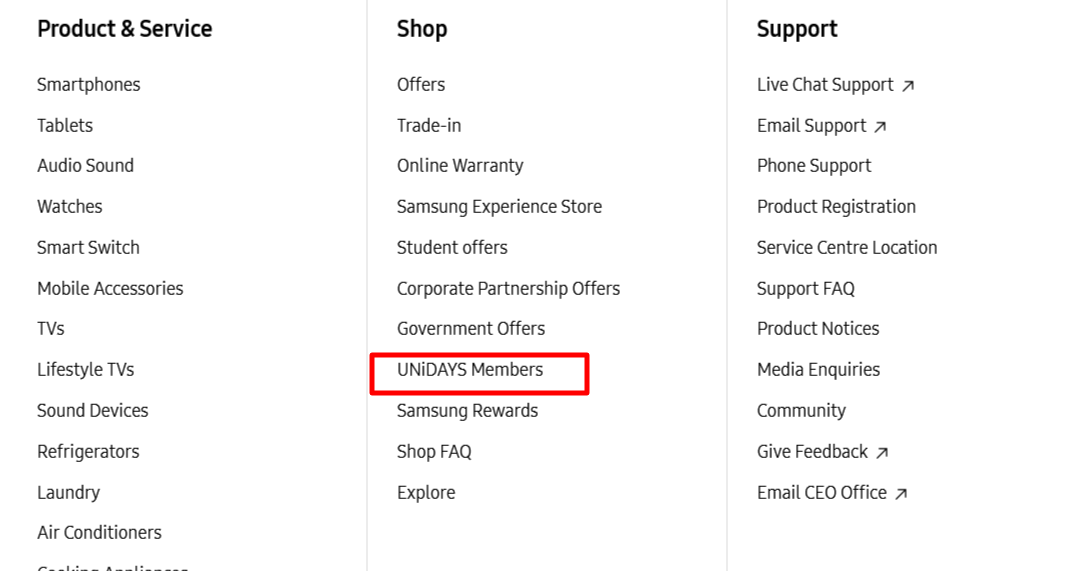
You can further your education and save up to 20% on a variety of Samsung products if you are a student or work in the field of education. Scroll down to the bottom of the Samsung website. Student offers with a red border around, words are written in black all on a white background and other link words.
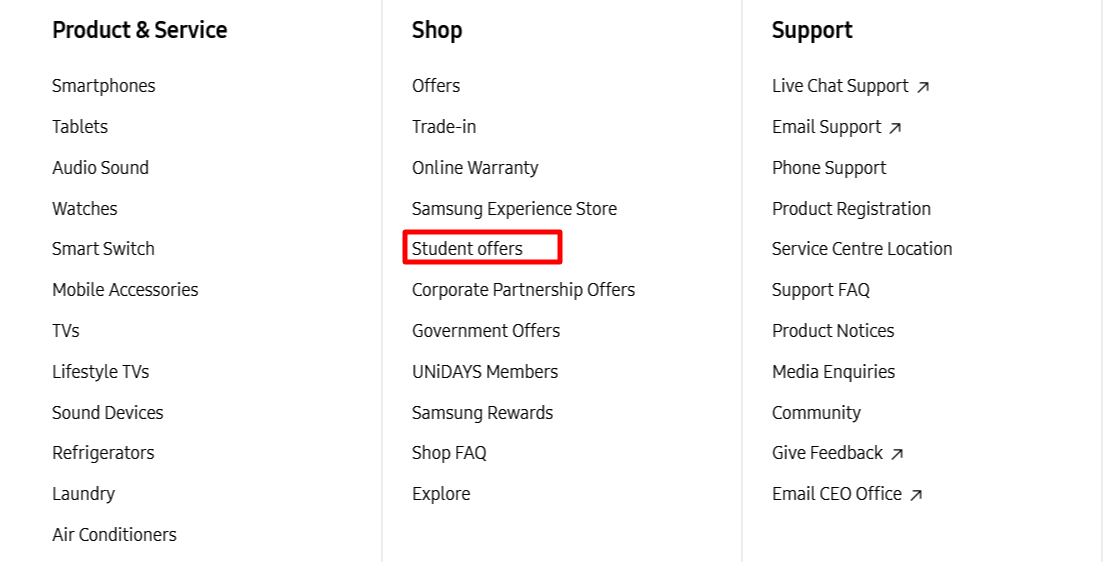
Register or log in on their website to learn more about Student/Education benefits and discounts on a range of Samsung products. Enjoy your Samsung student discount and save! A student looking down at a desk with multiple colour pens, The Samsung education store written in white over the student.

Contact Details & Opening Times

Give Samsung a call at +44 (0)330 726 2583 or 0330 726 7467, and they will be more than happy to help. During normal office hours, Samsung operates a Live Chat feature whereby you can talk directly to a representative in real-time. You can speak toSamsungvia phone Mon-Sun | 8 am to 10 pm.

More discount codes like Samsung