$60 SIM Only Plan for 165GB
Get a huge 165GB of data for just $60 with this amazing SIM only plan from Everyday Mobile.
Terms and conditions
Terms and Conditions apply.

Get a huge 165GB of data for just $60 with this amazing SIM only plan from Everyday Mobile.
Terms and conditions
Terms and Conditions apply.
Earn up to A$24.50 when you shop at Everyday Mobile through Love Cashback.
Get 110GB of data with Everyday Mobile's affordable $50 SIM only plan for reliable mobile coverage.
Terms and conditions
Terms and Conditions apply.
Get 70GB of data monthly with Everyday Mobile's $40 SIM only plan for reliable mobile coverage.
Terms and conditions
Terms and Conditions apply.
Never miss cashback. Our free Chrome extension alerts you automatically at every partner store.
Get 50GB of data for 30 days with this amazing $35 prepaid plan from Everyday Mobile.
Terms and conditions
Terms and Conditions apply.
Get 30GB of data for 30 days with this fantastic prepaid plan from Everyday Mobile for just $30.
Terms and conditions
Terms and Conditions apply.
Receive 10% off your Everyday Mobile 5G SIM card and benefit from fast mobile connectivity at an attractive price.
Terms and conditions
Get all your stuff to home without paying any extra charge at Woolworths Mobile.
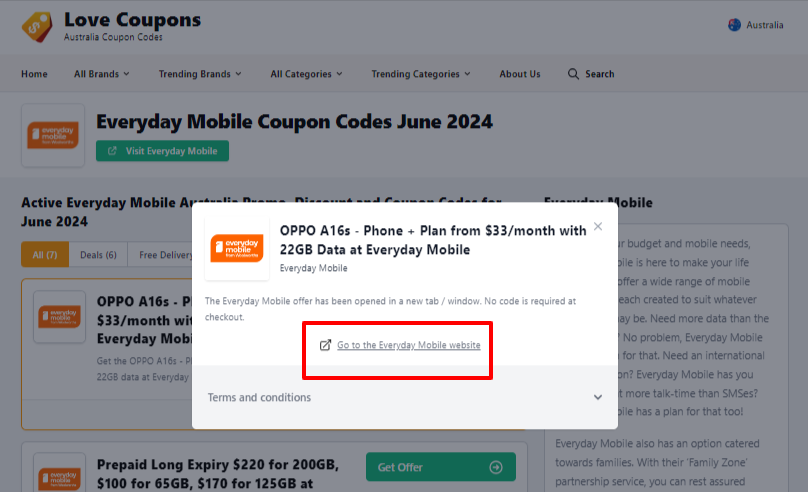
Found a sweet Love Coupons deal for your Everyday Mobile purchase? Here's how to use your promo code/offer:
To reveal your promo code, simply click, 'Get Coupon' and copy the code, if provided.
If the deal is an offer, you'll select 'Get Offer'.
NOTE: in the case of Offer deals, discounts will be automatically applied.
This page may open on its own, in which case proceed to Step 3.
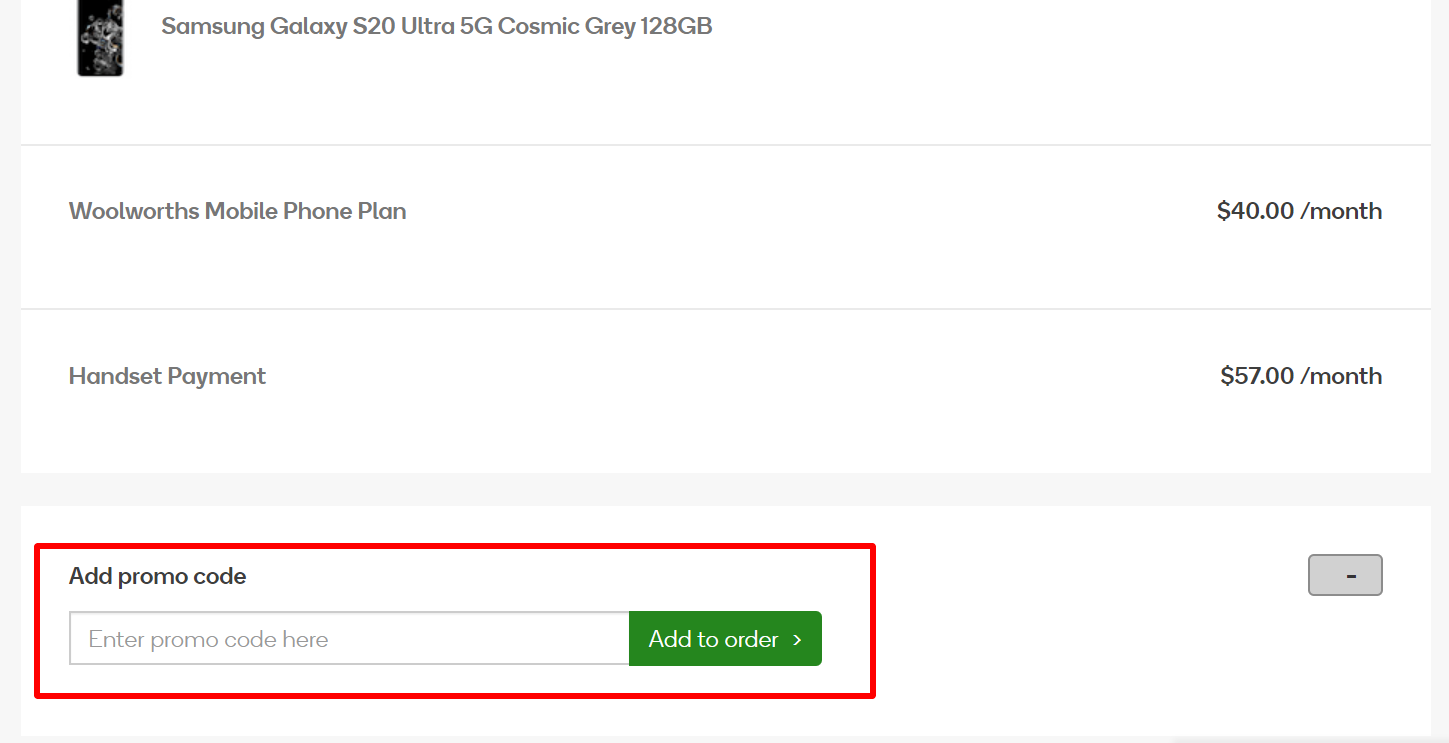
(If the offer did not have a code, your discount will be automatically applied).
Why is my promo code not working?
There are several reasons why your code might not be working:
Great tips & tricks for extra savings at Everyday Mobile:
Everyday Mobile Delivery Policy:
Everyday Mobile Returns, Refunds and Replacement Policy:
Faulty/Unsatisfactory Products with Proof of Purchase
You will receive a Consignment number through email. You need to enter your Consignment number into the Startrack website to track your order.
Recent data usage and call history will become visible after approximately 60 minutes.
You can update your contact number, email address, Woolworths Rewards number, and address via the "My Details" section of the Woolworths Mobile app or via the 'My Account' portal.
Everyday Mobile understand that sometimes unexpected events happen and that can affect your ability to meet your financial obligations. Make sure to refer to Everyday Mobile's Financial Assistance page for more information on how Everyday Mobile can help. Everyday Mobile's policies help you if you're having trouble with your payments, refer to their Credit & Collections Policy.
Activating your service may take up to 24 hours.
If you are porting, it usually depends on your current mobile carrier. The Mobile Number Portability Industry Code states that 90% of ports must be completed within 3 Standard Hours of Operation and 99% completed within 2 Business days.
Phone and SIM-only Plans
NOTE: Phone plans and SIM-only plans cost the same. However, Phone plans = the cost of the SIM-only plans plus the additional cost of your chosen handset.
Smartphones are only as smart as the network they're on!
Check your coverage with Everyday Mobile.
Check out these stores too:
Phone:
1300 793 417.
Live Chat
Chat with Olive, the Everyday Mobile Virtual Assistant, available 24/7.
Post Address: Woolworths Mobile, 1 Woolworths Way, Bella Vista NSW 2153.
Contact Hours:
Monday -Friday: 9 AM to 5 PM. Saturday: 10 AM to 4 PM. Sunday and Public Holidays: Closed. (AEST/AEDT)
9 AM to 5 PM Monday to Friday.
10 AM to 4 PM Saturdays.
(AEST/AEDT).
The Contact Centre is closed on Sunday and National Public Holidays.